Ever feel like you’re constantly checking dozens of websites just to stay updated?
One site posts breaking news. Another publishes industry insights. A third releases new podcast episodes. Keeping up with everything can quickly become overwhelming.
That’s where RSS Feed Meaning becomes important.
RSS feeds have been helping internet users organize content for decades. While social media algorithms decide what appears in your feed, RSS puts you back in control.
You choose the websites you want to follow and receive updates automatically.
Whether you’re a blogger, student, marketer, journalist, researcher, or simply curious about internet terminology, understanding RSS feeds can save time and improve how you consume online content.
This updated 2026 guide explains what RSS feeds are, how they work, where they’re used, and why they remain relevant despite the rise of social media platforms.
What Does RSS Feed Mean?
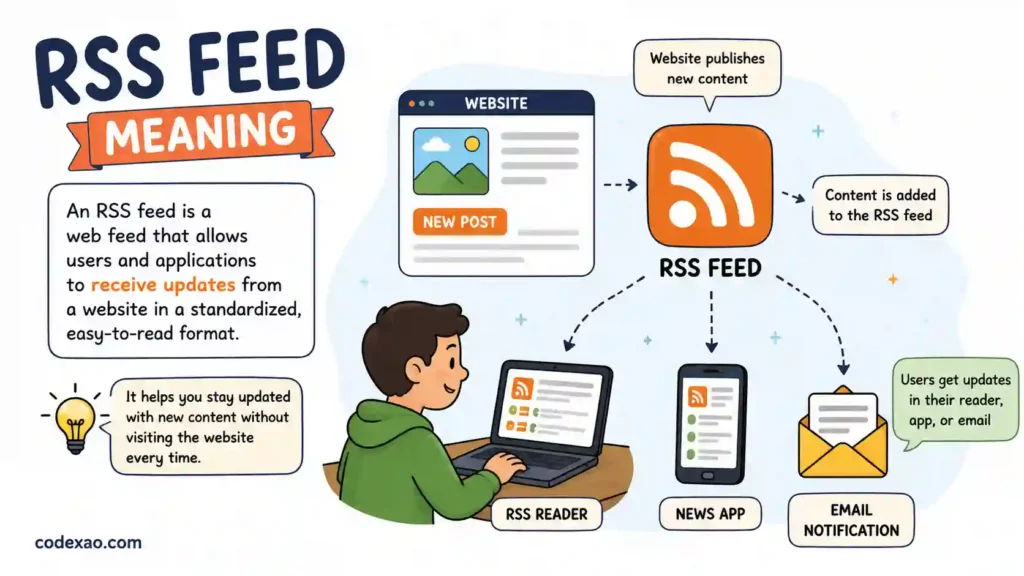
RSS Feed refers to a standardized web feed that allows websites to automatically share newly published content with subscribers.
Most people recognize RSS as Really Simple Syndication, though earlier versions were sometimes called Rich Site Summary.
Quick Answer
RSS Feed meaning is a technology that automatically delivers updates from websites, blogs, podcasts, and news sources to users through a feed reader, eliminating the need to manually visit each website.
Origin of RSS
RSS emerged in the late 1990s as the internet expanded rapidly. Website owners needed a simple way to distribute content updates, while users wanted a centralized method for following their favorite sites.
The technology gained popularity among:
- Bloggers
- News organizations
- Podcast creators
- Technology websites
- Research communities
Over time, RSS evolved into one of the internet’s most reliable content distribution methods.
Pronunciation
RSS is usually pronounced by saying each letter individually:
R-S-S
Some people simply refer to it as an “RSS feed.”
How RSS Feeds Work
Understanding RSS is easier than many people think.
Here’s the basic process:
Step 1
A website publishes new content.
Step 2
The website automatically updates its RSS feed file.
Step 3
An RSS reader checks the feed for updates.
Step 4
Subscribers instantly receive the new content notification.
Instead of visiting ten different websites daily, users can open a single RSS reader and view updates from all subscribed sources.
Popular content delivered through RSS includes:
- Blog articles
- News stories
- Podcast episodes
- Product updates
- Research publications
- Industry announcements
How to Use RSS Feeds Correctly
RSS feeds are not internet slang, but they are frequently discussed in digital communication, blogging, and online publishing.
Common Contexts
RSS feeds are commonly used for:
- Following favorite blogs
- Tracking industry news
- Monitoring competitors
- Receiving podcast updates
- Researching niche topics
Platform Usage
Blogs
Most blogging platforms automatically generate RSS feeds for readers.
News Websites
News organizations use RSS to distribute breaking stories instantly.
Podcasts
Podcast apps often rely on RSS feeds to deliver new episodes.
Research Platforms
Researchers use RSS to monitor journals and publications.
When to Use RSS
RSS is useful when:
- You follow many websites
- You want algorithm-free content
- You need faster updates
- You conduct research regularly
When RSS May Not Be Necessary
RSS may not be ideal if:
- You rely mainly on social media
- You follow very few websites
- You prefer manual browsing
Real Examples Using RSS Feeds
Example 1 Between Bloggers
Alex: How do you keep up with 50 marketing blogs?
Sarah: I subscribe to their RSS feeds in one reader.
Meaning: Sarah uses RSS to centralize website updates.
Example 2 News Monitoring
Reporter: Did that article just go live?
Editor: Yes, it appeared in our RSS feed instantly.
Meaning: The RSS feed automatically distributed the update.
Example 3 Podcast Listener
Friend: How do new podcast episodes appear automatically?
You: The app pulls them from the show’s RSS feed.
Meaning: RSS powers podcast distribution.
Example 4 Research Work
Student: How do you track new academic papers?
Professor: I subscribe to journal RSS feeds.
Meaning: RSS helps monitor new publications efficiently.
Example 5 Digital Marketing Team
Manager: How are we tracking competitor content?
Analyst: We monitor their RSS feeds daily.
Meaning: RSS assists with competitive research.
Common Mistakes and Misunderstandings
Many people misunderstand RSS technology.
Mistake 1 Thinking RSS Is Dead
One of the biggest myths is that RSS disappeared after social media became popular.
Reality:
Millions of websites, podcasts, and news organizations still use RSS every day.
Mistake 2 Confusing RSS With Email Newsletters
RSS and email newsletters both deliver updates, but they work differently.
Email newsletters arrive in your inbox.
RSS updates appear inside a feed reader.
Mistake 3 Believing RSS Is Only for Tech Experts
Modern RSS readers are simple and beginner-friendly.
Anyone can subscribe to feeds without technical knowledge.
Generational Differences
Older internet users often remember RSS from the blogging boom.
Younger users may discover RSS through:
- Podcasts
- Productivity tools
- Knowledge management systems
- Research workflows
RSS Feed Across Different Platforms and Demographics
Gen Z
Gen Z users often encounter RSS indirectly through podcast apps and content aggregators.
Millennials
Millennials frequently use RSS for blogs, newsletters, technology news, and professional learning.
Professionals
Journalists, marketers, researchers, and analysts remain among the most active RSS users.
Content Creators
Creators use RSS to:
- Distribute content
- Grow audiences
- Power newsletters
- Syndicate podcasts
Is RSS Formal or Informal
RSS is a technical internet term rather than slang.
It is perfectly acceptable in:
- Business settings
- Academic environments
- Professional communication
- Technical documentation
Related Slang Abbreviations and Alternatives
| Term | Meaning |
|---|---|
| RSS | Really Simple Syndication |
| Atom Feed | Alternative web feed format |
| Feed Reader | Software that reads RSS feeds |
| Podcast Feed | RSS feed for podcast episodes |
| Content Syndication | Distribution of content across platforms |
| Aggregator | Tool that collects information from multiple sources |
| Newsletter | Email-based content updates |
| Push Notification | Real-time alert sent to devices |
| Blog Subscription | Following blog updates |
| Feed URL | Web address of an RSS feed |
Similar Concepts
- Content subscriptions
- News aggregators
- Website alerts
- Update notifications
Opposite Approaches
Instead of RSS, users may:
- Visit websites manually
- Depend on social media algorithms
- Search for updates individually
FAQs:
What does RSS feed stand for?
RSS most commonly stands for Really Simple Syndication. It is a format used to distribute website content automatically to subscribers through feed readers and compatible applications.
Is RSS still relevant in 2026?
Yes. RSS remains valuable for content creators, researchers, journalists, marketers, and podcast listeners who want direct access to content without relying on social media algorithms.
What is an RSS reader?
An RSS reader is an application that collects and displays updates from subscribed RSS feeds in one organized location, making content consumption easier.
Are RSS feeds free?
Most RSS feeds are completely free. Users can subscribe to website updates without paying, although some premium RSS reader tools may offer advanced features.
Can podcasts use RSS feeds?
Yes. RSS is the backbone of podcast distribution. Podcast apps use RSS feeds to discover, update, and deliver new episodes automatically.
Is RSS better than social media?
RSS offers more control because content appears chronologically without algorithmic filtering. Social media may provide broader discovery but often limits what users see.
Conclusion:
The RSS Feed Meaning is surprisingly simple once you understand it.
RSS is a technology that automatically delivers content updates from websites, blogs, podcasts, and news platforms directly to subscribers. It saves time, reduces information overload, and gives users complete control over what they follow.
Even in 2026, RSS continues to power podcasts, news distribution, research workflows, and content marketing strategies around the world.
If you’re tired of chasing updates across dozens of websites, RSS might be one of the most useful internet tools you’ve never fully explored.
What’s your favorite way to stay updated online? Share it in the comments and explore more digital communication guides on our site.

Hi, I’m Isabella Brown, the voice behind Codexao.com, where meanings aren’t just explained, they’re made easy to understand.
I’ve always been fascinated by how words shape the way we think, speak, and connect. But let’s be honest—most definitions out there feel confusing, outdated, or just plain boring.
That’s exactly why I created Codexao. Here, I break down words, slang, and modern expressions into simple, clear meanings you can actually use in real life.